

2026.05.13
LY Ads
Search Ads
Display Ads
Upcoming
Updates
May 13, 2026: The article has been updated due to changes regarding the end of sign in using one-time passcodes.
April 7, 2026: This article has been updated because changes were made to the “Implementation details” regarding the end of support for sign in using a one-time passcode.
March 11, 2026: The article has been updated following the discontinuation of the Business ID switching feature in the Campaign Editor.
February 19, 2026: The article was published.
April 7, 2026: This article has been updated because changes were made to the “Implementation details” regarding the end of support for sign in using a one-time passcode.
March 11, 2026: The article has been updated following the discontinuation of the Business ID switching feature in the Campaign Editor.
February 19, 2026: The article was published.
Product
LY Ads
Summary
As previously announced in “[Yahoo! JAPAN Ads] Notice of implementation details regarding Business ID integration,” we would like to inform you about the end of support for sign in using a one-time passcode and the end of support for the switching feature in Campaign Editor.
Discontinuation of sign-in using one-time passcodes
Schedule (Planned)
May 31, 2026 (Sunday)
*The schedule is subject to change.
*The schedule is subject to change.
Details
[Updated: May 13, 2026]
Sign in using one-time passcodes will be terminated on the scheduled end date above. Please complete Business ID integration as soon as possible. For integration procedures, refer to "How to integrate Business IDs".
Please note that once Business IDs are integrated, one-time passcodes will no longer be available. After integration, please sign in using a business account with a LINE Business ID. By setting up a business account, you will be able to sign in using your registered email address and password. For setup instructions, refer to "How to sign in with a LINE Business ID".
・After the termination of one-time passcodes, the "One-time Passcode" button on the sign in screen will be renamed to "Business ID Integration (One-time Passcode)".
・Customers who currently use only one-time passcodes to sign in will be required to integrate Business IDs and set up a business account after the termination. Clicking the "Business ID Integration (One-time Passcode)" button will redirect you to the Business ID integration screen for a certain period.
・After a certain period, the "Business ID Integration (One-time Passcode)" button will be removed. After removal, signing in or integrating with an unintegrated Business ID will only be possible via Yahoo! JAPAN ID sign in.
Sign in using one-time passcodes will be terminated on the scheduled end date above. Please complete Business ID integration as soon as possible. For integration procedures, refer to "How to integrate Business IDs".
Please note that once Business IDs are integrated, one-time passcodes will no longer be available. After integration, please sign in using a business account with a LINE Business ID. By setting up a business account, you will be able to sign in using your registered email address and password. For setup instructions, refer to "How to sign in with a LINE Business ID".
・After the termination of one-time passcodes, the "One-time Passcode" button on the sign in screen will be renamed to "Business ID Integration (One-time Passcode)".
・Customers who currently use only one-time passcodes to sign in will be required to integrate Business IDs and set up a business account after the termination. Clicking the "Business ID Integration (One-time Passcode)" button will redirect you to the Business ID integration screen for a certain period.
・After a certain period, the "Business ID Integration (One-time Passcode)" button will be removed. After removal, signing in or integrating with an unintegrated Business ID will only be possible via Yahoo! JAPAN ID sign in.
Notes
[Added: May 13, 2026]
After the "Business ID Integration (One-time Passcode)" button is removed, if you are unable to sign in with a Yahoo! JAPAN ID, you will need to create a new Business ID. Additionally, if you wish to use existing accounts with the newly created Business ID, a user with administrative privileges for the existing account must invite the new Business ID user to the account.
To ensure stable ad operations, we strongly recommend completing Business ID integration before the termination date.
After the "Business ID Integration (One-time Passcode)" button is removed, if you are unable to sign in with a Yahoo! JAPAN ID, you will need to create a new Business ID. Additionally, if you wish to use existing accounts with the newly created Business ID, a user with administrative privileges for the existing account must invite the new Business ID user to the account.
To ensure stable ad operations, we strongly recommend completing Business ID integration before the termination date.
Discontinuation of the Business ID switching feature in the Campaign Editor
Schedule
March 10, 2026 (Tuesday)
Summary
The feature that allows multiple Business IDs to be registered and switched within the Campaign Editor has been discontinued.
Data downloaded to your local environment in the Campaign Management Tool will continue to be available. If you plan to continue using it, please configure the following settings to require sign in each time. By signing in again when launching the Campaign Management Tool, you will be able to use the data in your local environment.
■Search Ads
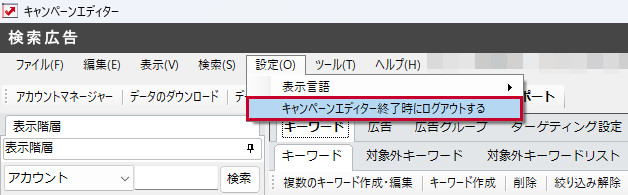
Select “Settings” > “Sign out when closing the Campaign Management Tool.”
Data downloaded to your local environment in the Campaign Management Tool will continue to be available. If you plan to continue using it, please configure the following settings to require sign in each time. By signing in again when launching the Campaign Management Tool, you will be able to use the data in your local environment.
■Search Ads
Select “Settings” > “Sign out when closing the Campaign Management Tool.”
■Display Ads
Select “Settings” > “Sign in Information” > Uncheck “Save sign in information.”

Comments
Download the following PDF for more details.
Download the Document
Download the Document
- Related Tag:
- #LY Ads